automatic bounce management

Repeated sending to incorrect/inactive recipients is considered “spammer behavior.”
RealSender’s “copymail” app handles this automatically and transparently.
The receiver will only see the original sender, who will continue to receive replies from the recipients.
Email messages contain a header that remains invisible to the recipient. It’s called “Return-Path” and allows error messages to be sent to another email address.
Copymail automatically populates it with valuable information that, in addition to allowing them to be received, will also allow it to determine which list the message was sent from and which email address generated the error.
Below is an example of the header inserted in a message,
sent from the “test” list to the recipient "wrong.address@customer.com":
Return-Path: <test-bounces+wrong.address=customer.com@mXXX-realsender.com>
The application identifies two types of errors:
hard bounce (status-code 5.XXX.XXX): the email address generated a permanent error
such as “550 5.1.1 … User unknown” or “5.1.2 … Host unknown”
A permanent error indicates that you should never send to that recipient again.
soft bounce (status-code 4.XXX.XXX): the email address generated a temporary error
such as “452 4.2.2 … Mailbox full”
A transient error indicates that you can retry delivery in the future.
Here’s a brief description of how automatic bounce management works:
-
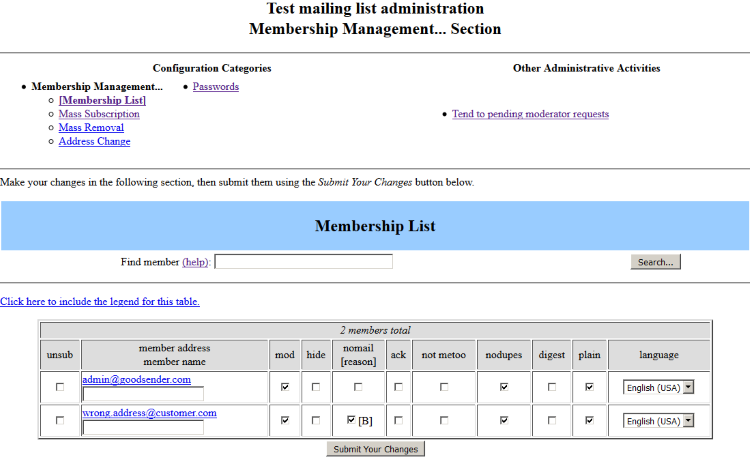
After three hard bounces (permanent error, e.g., “user unknown”) or six soft bounces (temporary error, e.g., “mailbox full”), the recipient is blocked and a checkmark is added under the “nomail” column in the subscriber list.
-
Once the recipient is blocked, three “Your subscription to the list … has been disabled” messages are sent before the recipient is removed from the list.
-
When the recipient is removed from the list, the administrator receives an email notification.
Note: Only one error per day affects the subscriber’s score, so even if ten bounces are received in the same day, the score will only increase by one.
All these operations may seem simple and manageable even manually by an operator.
This is only possible with very small numbers, up to a few hundred recipients.
On average, about 20% of sent messages are bounced back.
For every 1,000 emails, about 200 are bounced,
which become unmanageable without the help of an automated system.
Request a free trial
unsubscribe management
1. The use of automated calling and communication systems without
human intervention (automatic calling machines), facsimile machines (fax)
or electronic mail for the purposes of direct marketing may be allowed
only in respect of subscribers or users who have given their prior consent.

2. Notwithstanding paragraph 1, where a natural or legal person obtains
from its customers their electronic contact details for electronic mail,
in the context of the sale of a product or a service, in accordance with
Directive 95/46/EC, the same natural or legal person may use these electronic
contact details for direct marketing of its own similar products or services
provided that customers clearly and distinctly are given the opportunity
to object, free of charge and in an easy manner, to such use of electronic
contact details at the time of their collection and on the occasion of each
message in case the customer has not initially refused such use.

-- Unsolicited communications, extract from Article 13 of Directive 2002/58/EC
This rule, now outdated, is still used as a basis of principle. In short:
- The recipients must have requested to receive messages
- The only exception is if they are already a customer, and even then
they must always be given the option to unsubscribe
Beyond the legal implications, failure to comply with these simple rules essentially leads to being labeled a “spammer.”
The damage caused can even lead to the inability to reach even those recipients who wish to receive your communications.
RealSender’s “copymail” app provides a link to an “options” page for unsubscribing from each list,
which the customer can include in email messages. Here’s an example:
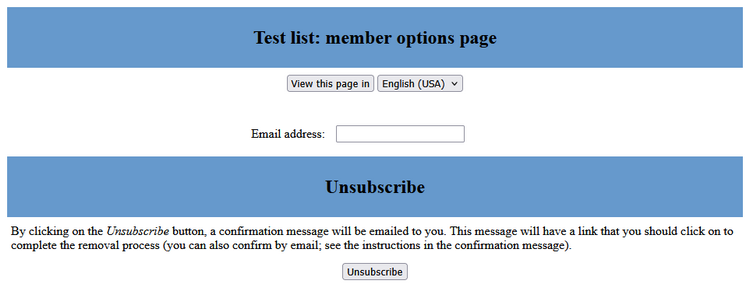
After completing the form, the entered address will receive an email
inviting them to click the link to confirm the cancellation:
We have received a request ... for the removal of your email
address, ... from the ... mailing list.  To confirm that you want
to be removed from this mailing list, visit this web page:
(http address for unsubscription confirmation)
This same message is sent to those requesting unsubscription
via the “List-Unsubscribe: …” header, which is automatically inserted into every email sent.
This header allows webmail applications like Gmail to activate the “Unsubscribe” link
directly in the interface, without requiring the user to search for it in the message.
To be notified of all unsubscribes made independently by recipients, it is recommended
to activate the notification feature to the administrator’s email address
from the “General Options” of the list:

Request a free trial